
No-Code Workflow
Builder.
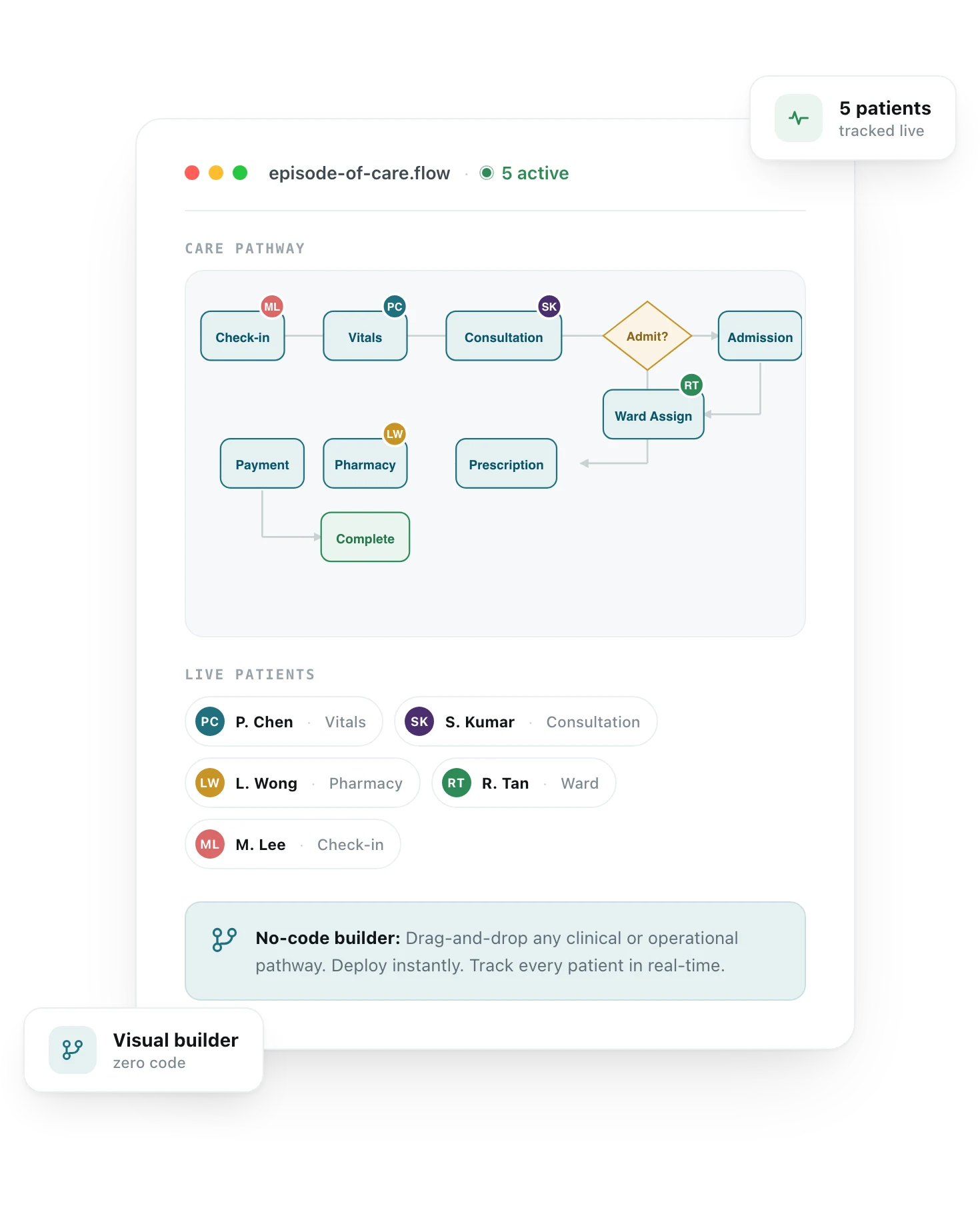
Your AI-Powered Engine for Care Pathway Automation. Design, deploy, and track any clinical or operational workflow — visually, without code. From multi-station health check-ups to chronic care programs, automate every step, condition, and handoff. See exactly where every patient is, in real-time.
Healthcare still runs on rigid, hard-coded systems.
Most clinic and hospital platforms come with pre-defined workflows. Need to add a step? File a ticket with the vendor. Need to change a routing condition? Wait months for a custom development cycle.
The result: clinical teams work around the system with paper checklists, WhatsApp groups, and manual handoffs. IT teams spend months hard-coding processes that change faster than the code ships.
Adding a workflow step
3–6 months vendor request
5 minutes, no code
Changing routing logic
Custom dev cycle
Drag-and-drop edit
Seeing patient position
Ask the front desk
Real-time dashboard
Chronic care follow-ups
Manual reminders
Automated, adaptive
Automate anything. Track everything.
A full-featured visual workflow engine embedded natively in your clinic or hospital operating system.
Visual Drag-and-Drop Builder
Design workflows visually with nodes, conditions, branches, and loops. No coding required. IT teams, clinical ops, or admins can build and iterate in minutes — not months.
Conditional Logic & Routing
If/then branching based on clinical decisions, patient responses, test results, or any data point. Workflows adapt dynamically to each patient's journey.
Real-Time Patient Tracking
See exactly where each patient is in their care pathway. Color-coded status across every active workflow. Operational visibility at a glance — across the entire facility.
Auto-Generated Tasks & Tickets
Workflows automatically create tasks, tickets, orders, and assignments at each step. Handoffs are seamless. Nothing falls through the cracks.
Communication Workflows
Build dynamic patient communication flows. Messages, reminders, and follow-ups that adapt based on patient responses, clinical triggers, and timing.
AI-Enhanced Automation
AI suggests optimal routing, predicts bottlenecks, auto-classifies patient inputs, and generates workflow templates from natural language descriptions.
From quick visits to year-long care programs.
The same engine powers 10-minute clinic visits and 12-month chronic care pathways.
Multi-Station Health Check-ups
Orchestrate patient flow across blood draw, imaging, vitals, specialist consults, and results review. Each station triggered automatically. Patients and staff see the next step in real-time.
Inpatient Admission Routing
When a consult results in admission, the workflow auto-creates bed requests, nursing tasks, inpatient orders, and family notifications. If not admitted — routes to prescription, pharmacy, payment.
Chronic Care Programs
Long-running workflows for diabetes management, cardiac rehab, oncology follow-up. Automated reminders, scheduled check-ins, and escalation paths when patients miss steps.
Patient Communication Flows
Pre-visit questionnaires, post-discharge follow-ups, satisfaction surveys. Patient responses dynamically change the next step. No manual coordination needed.
Design → Deploy → Track → Optimize.
Speed, visibility, and zero missed steps.
Minutes
To build any workflowWhat used to take months of vendor negotiations and custom development now takes minutes in a visual builder. Your team owns the process completely.
Zero
Missed handoffsEvery step auto-generates tasks, tickets, and assignments. Patients move through their care pathway with nothing falling through the cracks.
Real-time
Patient visibilitySee every patient’s position across every workflow in the facility. Identify bottlenecks before they cascade. Operational awareness at a glance.
Infinite
FlexibilityUnlike rigid pre-built systems, automate any process — from a 3-step clinic visit to a 50-step chronic care program with dozens of branches. No limits.
AI supercharges every workflow.
The workflow engine is powerful on its own. AI makes it intelligent — predicting, optimizing, and learning from every patient journey.
Smart Routing
AI suggests optimal step ordering based on resource availability and patient priority.
Bottleneck Prediction
Predicts workflow congestion points before they happen. Recommends load balancing.
Auto-Classification
Classifies patient inputs, form responses, and clinical data to trigger the right branch automatically.
Natural Language Creation
Describe a workflow in plain language. AI generates the node structure, conditions, and triggers.
Performance Insights
Monitors completion rates, average times, and drop-offs. Suggests improvements with projected impact.
Continuous Learning
Workflows improve over time. AI adapts routing, timing, and escalation rules based on real outcomes.
“Create a post-discharge follow-up flow with a check-in call at day 2, a satisfaction survey at day 7, and escalation to the care team if the patient reports pain above 6.”
AI generates the workflow with 6 nodes, 2 decision branches, and 3 automated notifications.
Built for everyone in the care facility.
IT Teams
Stop hard-coding workflows. Build, test, and deploy in the visual editor. Ship faster. Maintain less.
Clinical Operations
Design care pathways that match how your facility actually works. Iterate based on real performance data.
Care Managers
Chronic care programs with automated reminders, escalation paths, and full patient journey visibility.
Facility Leadership
Real-time dashboards showing patient throughput, bottlenecks, and operational efficiency across all workflows.
Native on Mazecare OS. Open by design.
Native on Mazecare Clinic & Hospital OS
Workflows run on live patient, encounter, and order data. Tasks, tickets, and notifications generated natively. No integration overhead — it's built in.
External Actions & Webhooks
Any workflow step can call external APIs, send SMS/email/WhatsApp, create records in external systems, or trigger webhooks. Full orchestration power.
Versioning & Audit Trail
Every workflow change is versioned. Full audit trail of who changed what, when. Roll back to any previous version. Compliance-ready out of the box.

Visual, flexible, and AI-native — vs. everything else.
| Feature | Mazecare | Rigid Pre-built | Custom Hard-coded |  |
|---|---|---|---|---|
| No-code visual builder | N/A | |||
| Conditional branching & routing | Limited | |||
| Real-time patient tracking | Limited | Partial | ||
| Auto task & ticket generation | Limited | Manual | ||
| Communication workflows | Partial | Manual | ||
| AI-enhanced routing | ||||
| Modify without developers | N/A | |||
| Chronic care / multi-day workflows | Limited | Partial | Manual | |
| Multi-station orchestration | Partial | Manual | ||
| Live operational dashboard | Basic | Partial | ||
| Deploy changes in minutes | N/A | |||
| Embedded in clinical OS | ✓ Mazecare OS | Partial |
Frequently asked questions.
No. The visual builder is designed for IT ops, clinical coordinators, and admin teams. You drag nodes, set conditions, connect steps, and publish — all without writing a single line of code. Developers can still use APIs for advanced integrations if needed.
Yes. Chronic care workflows can run for weeks, months, or indefinitely. Steps trigger based on time (e.g., 'wait 3 days, then send reminder'), events (e.g., 'lab result received'), or patient actions (e.g., 'patient completed questionnaire'). There's no limit to duration or complexity.
Each patient's position in a workflow is updated as steps complete or events trigger. Dashboards show all active patients across all workflows in the facility. Staff can see who's waiting, who's in-progress, and where bottlenecks are forming — in real-time.
Yes. You can publish changes that apply only to new patients entering the workflow, while existing patients continue on their original flow. Or you can migrate active patients to the updated workflow if appropriate.
AI works at multiple levels: it suggests optimal step ordering, predicts bottlenecks before they happen, auto-classifies patient inputs to route dynamically, generates workflow templates from natural language descriptions, and continuously monitors performance to suggest improvements.
Yes. Any workflow step can call external APIs, send notifications via SMS/email/WhatsApp, create records in external systems, trigger webhooks, or interact with third-party tools. This makes it a true orchestration engine, not just an internal tool.
Ready to automate any care pathway?
See the visual workflow builder on your own clinical processes. Build your first workflow in minutes.